Following my previous article on how to build a static personal website, today I’m bringing you another technical guide: how to resolve theme conflicts when adding math formula support to a personal website.
First off, Hugo’s official documentation already explains how to implement math rendering very clearly. You can find their official guide here. Since their documentation is highly detailed and covers configuration code for various file formats, I won’t repeat their steps here (though if anyone needs a Chinese breakdown, I can write one later). I will jump straight into my own troubleshooting process.
The issue I encountered arose because I had installed the PaperMod theme, but my config file wasn’t explicitly using “goldmark” as the renderer (which is what the official guide assumes). This caused a disconnect when I tried to implement the feature. If you’ve run into a similar issue, my solution might help.
The official tutorial instructs you to modify the header section of baseof.html inside your layout’s _default folder, and to create a new math.html file in the partials folder. However, when I did this directly inside the theme files, it triggered an incompatibility with PaperMod. Here is the error I received:
Changes not staged for commit:
  (use "git add <file>..." to update what will be committed)
  (use "git restore <file>..." to discard changes in working directory)
  (commit or discard the untracked or modified content in submodules)
        modified:   themes/PaperMod (modified content, untracked content)
So, how do we fix this? We need to locate the layouts folder at the root directory of our web project, which sits one level above the themes folder. Settings added to this root layouts folder will take precedence over the theme’s layout settings during deployment and rendering. Therefore, any new files or modifications you add here will be loaded without breaking PaperMod or any other installed themes—in other words, an override.
Ensure your folder structure logically matches the diagram below:
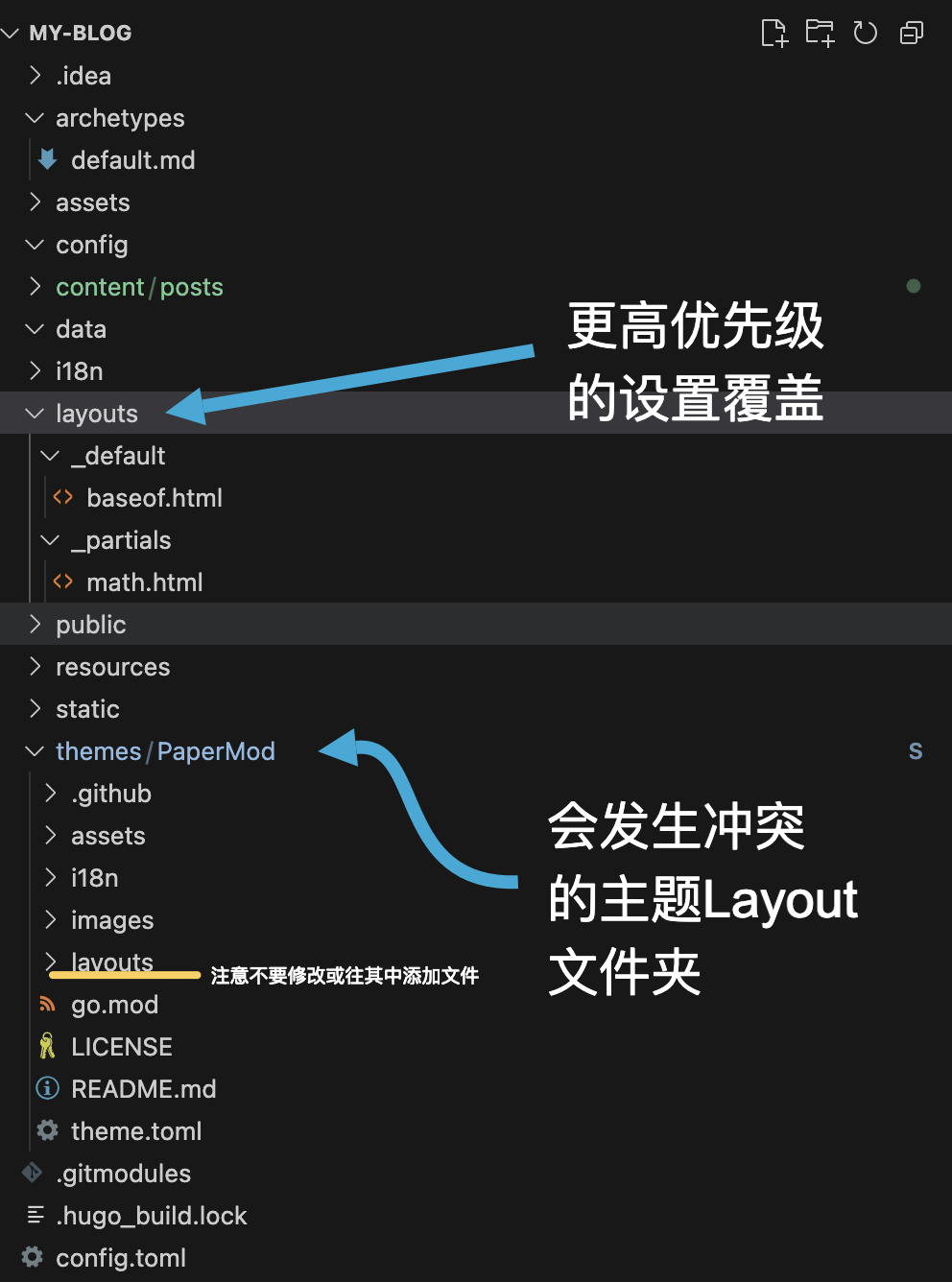
After confirming this, check your configuration file. Using TOML as an example, I explicitly added the entire Goldmark configuration block to ensure my settings successfully overwrote the defaults. In the code below, pay special attention to the annotated lines (if you use YAML or JSON, follow the same logic but adjust the syntax accordingly. The official Goldmark documentation can be found here):
[markup]
  defaultMarkdownHandler = 'goldmark' # Ensure goldmark is set as the default markdown renderer here
  [markup.goldmark]
    duplicateResourceFiles = false
    [markup.goldmark.extensions]
      definitionList = true
      linkify = true
      linkifyProtocol = "https"
      strikethrough = true
      table = true
      taskList = true
      [markup.goldmark.extensions.cjk]
        eastAsianLineBreaks = false
        eastAsianLineBreaksStyle = "simple"
        enable = false
        escapedSpace = false
      [markup.goldmark.extensions.extras]
        [markup.goldmark.extensions.extras.delete]
          enable = false
        [markup.goldmark.extensions.extras.insert]
          enable = false
        [markup.goldmark.extensions.extras.mark]
          enable = false
        [markup.goldmark.extensions.extras.subscript]
          enable = false
        [markup.goldmark.extensions.extras.superscript]
          enable = false
      [markup.goldmark.extensions.footnote]
        backlinkHTML = "↩︎"
        enable = true
        enableAutoIDPrefix = false
      [markup.goldmark.extensions.passthrough]
        enable = true
        [markup.goldmark.extensions.passthrough.delimiters]
          block = [['\[', '\]'], ['$$', '$$']] # You MUST add these delimiters
          inline = [['\(', '\)']] # You MUST add these delimiters
      [markup.goldmark.extensions.typographer]
        apostrophe = "’"
        disable = false
        ellipsis = "…"
        emDash = "—"
        enDash = "–"
        leftAngleQuote = "«"
        leftDoubleQuote = "“"
        leftSingleQuote = "‘"
        rightAngleQuote = "»"
        rightDoubleQuote = "”"
        rightSingleQuote = "’"
    [markup.goldmark.parser]
      autoDefinitionTermID = false
      autoHeadingID = true
      autoIDType = "github"
      wrapStandAloneImageWithinParagraph = true
      [markup.goldmark.parser.attribute]
        block = false
        title = true
    [markup.goldmark.renderHooks]
      [markup.goldmark.renderHooks.image]
        useEmbedded = "never"
      [markup.goldmark.renderHooks.link]
        useEmbedded = "never"
    [markup.goldmark.renderer]
      hardWraps = false
      unsafe = true # To prevent Goldmark from treating LaTeX input as unsafe/malicious, I disabled the safety block here.
      xhtml = false


[params]
  math = true # Do not forget to add this as well
Once you’ve done this, you should be able to input mathematical formulas using the proper syntax, and they will render successfully upon deployment. For example:
Before rendering:
This is an inline \(a^*=x-b^*\) equation.

These are block equations:

\[a^*=x-b^*\]

\[ a^*=x-b^* \]

\[
a^*=x-b^*
\]

These are also block equations:

$$a^*=x-b^$$

$$a^*=x-b^$$

$$
a^*=x-b^*
$$
After rendering:
This is an inline \(a^*=x-b^*\) equation.
These are block equations:
\[a^*=x-b^*\]\[ a^*=x-b^* \]\[ a^*=x-b^* \]These are also block equations:
$$a^*=x-b^*$$$$a^*=x-b^*$$$$ a^*=x-b^* $$Finally, I’m attaching the contents of the two HTML files located in my root layouts folder so you can reference and modify them for your own setup.
baseof.html
{{- if lt hugo.Version "0.146.0" }}
{{- errorf "=> hugo v0.146.0 or greater is required for hugo-PaperMod to build " }}
{{- end -}}

<!DOCTYPE html>
<html lang="{{ site.Language }}" dir="{{ .Language.LanguageDirection | default "auto" }}">

<head>
    {{- partial "head.html" . }}

    {{ if .Param "math" }}
      {{ partialCached "math.html" . }}
    {{ end }}

</head>

<body class="
{{- if (or (ne .Kind `page` ) (eq .Layout `archives`) (eq .Layout `search`)) -}}
{{- print "list" -}}
{{- end -}}
{{- if eq site.Params.defaultTheme `dark` -}}
{{- print " dark" }}
{{- end -}}
" id="top">
    {{- partialCached "header.html" . .Page -}}
    <main class="main">
        {{- block "main" . }}{{ end }}
    </main>
    {{ partialCached "footer.html" . .Layout .Kind (.Param "hideFooter") (.Param "ShowCodeCopyButtons") -}}
</body>

</html>
math.html
<script id="MathJax-script" async src="https://cdn.jsdelivr.net/npm/mathjax@4/tex-mml-chtml.js"></script>

<script>
  MathJax = {
    tex: {
      displayMath: [['\\[', '\\]'], ['$$', '$$']],  // block
      inlineMath: [['\\(', '\\)']]                  // inline
    },
    loader:{
      load: ['ui/safe']
    },
  };
</script>
That covers everything for this article. I hope you find it helpful!
MISC:
The following syntax will cause a rendering error. The core reason is likely that you cannot mix markdown bolding (**) and MathJax expressions within a heading.
#### **(h)$r|\hat{y}$