As the title suggests, this article is a hands-on review of my first experience with the Apple Vision Pro. I spent about an hour at the Apple Eaton Centre (with the Vision Pro actually on my head for about 30 to 40 minutes), exploring many aspects of the device alongside an Apple staff member. After the whole process, I have a lot I want to share.
After the actual experience, my conclusions haven’t changed compared to watching videos from other tech reviewers. As always, I habitually place the core message and my conclusions at the very beginning of the article. My current personal view is: The Vision Pro is a forward-looking spatial computing device, and its original design philosophy leaves it with no competitors in the current market. However, putting aside specific use cases and viewing it purely as a consumer electronic product, it is unacceptable at its current price. Even after all this time, it still has too many pressing issues that need to be resolved.
Preconditions
- The Vision Pro I tested was only a demo unit equipped with an M5 chip; other specs are unknown.
- I have 175 to 225 degrees of myopia with slight astigmatism in both eyes. Apple measured my glasses on-site and provided customized lenses for the demo, but this was only for demonstration purposes. I don’t know if the experience with an actual purchased unit would differ.
- During the experience, it was just me and the staff member. He guided my usage the entire time and had an iPad mirroring the screen in front of me in real-time. The actual learning curve and ease of operation might vary depending on whether you have someone beside you guiding you.
- Because it was a demo unit, I could not link it with other Apple devices or connect other accessories. Regarding “how Vision Pro works in tandem with other devices,” I will deduce that based on other online reviews combined with today’s hands-on experience.
- I will specifically note any other details pertaining only to the demo unit within the text.
Appearance
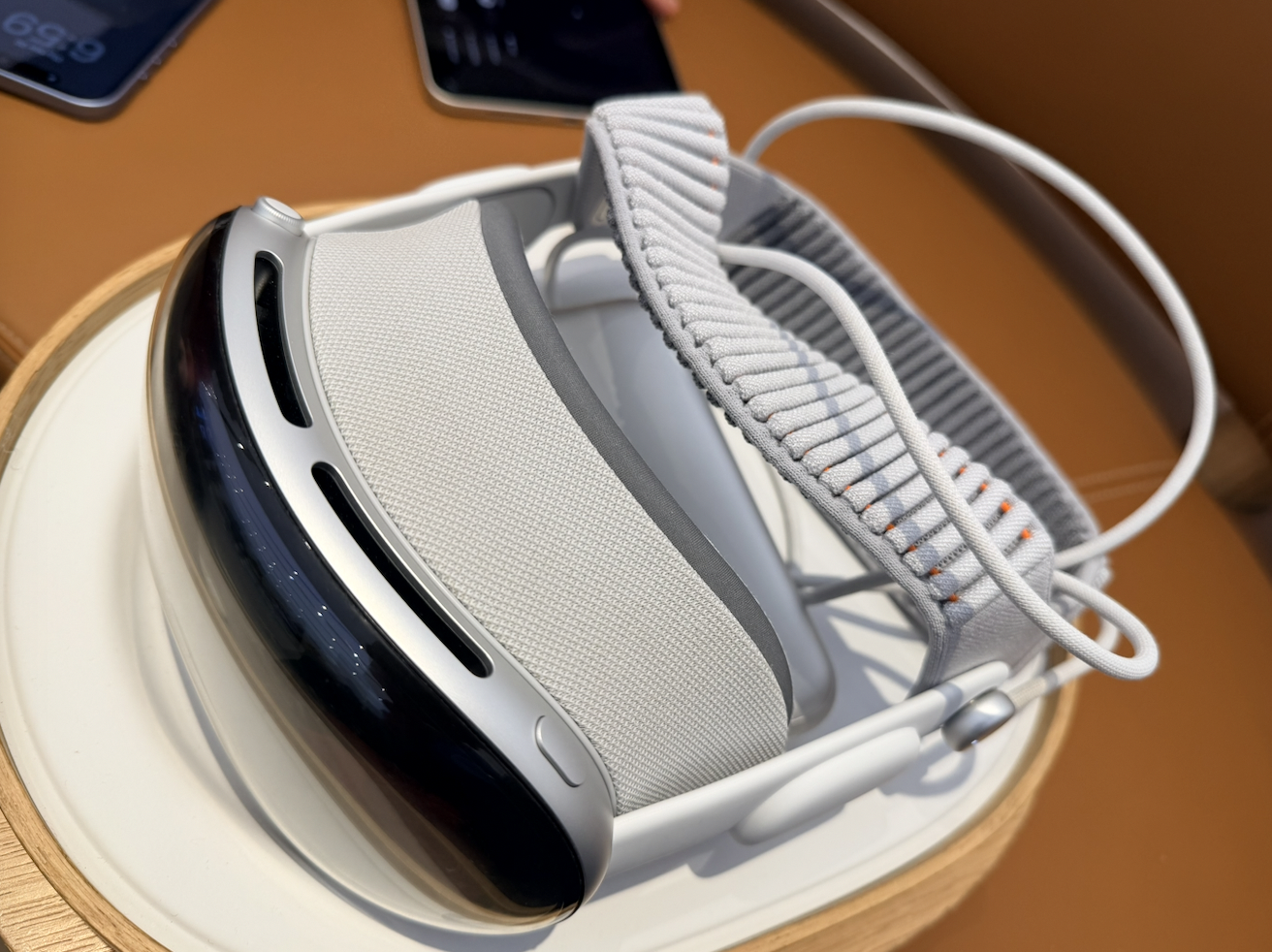
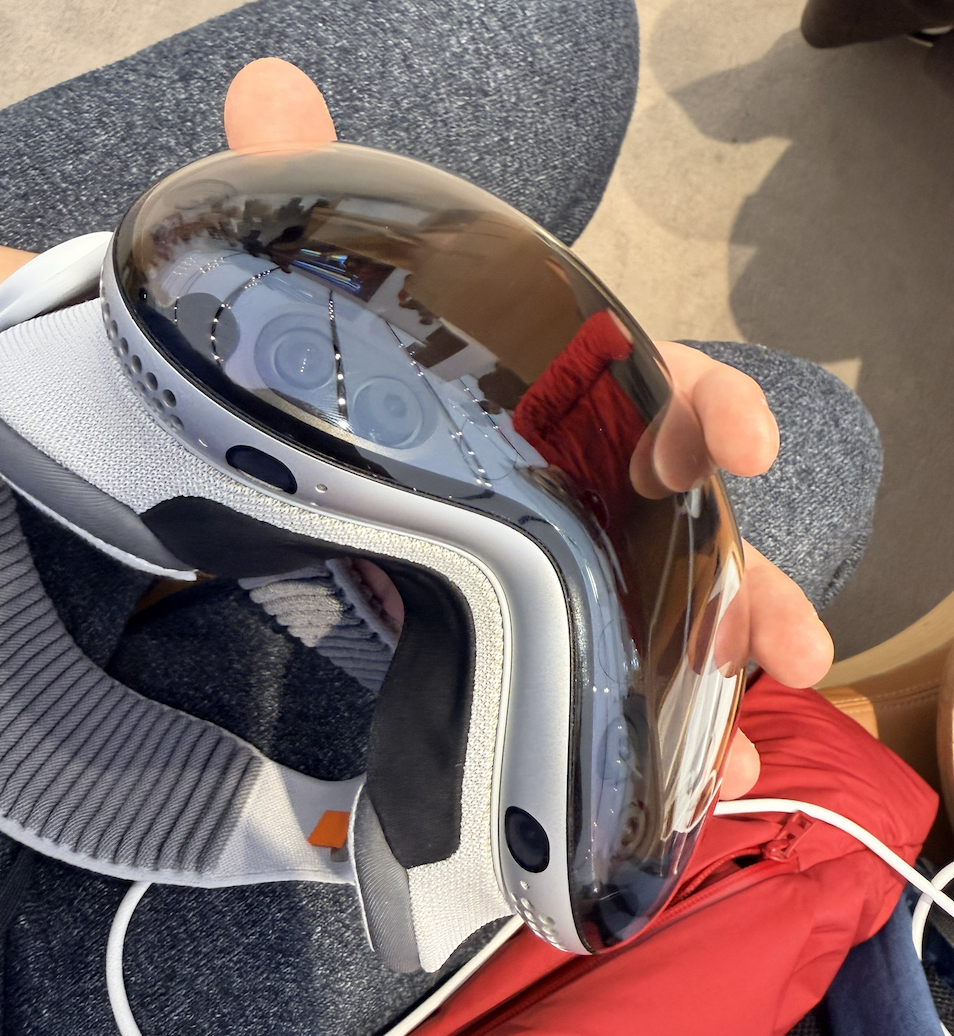
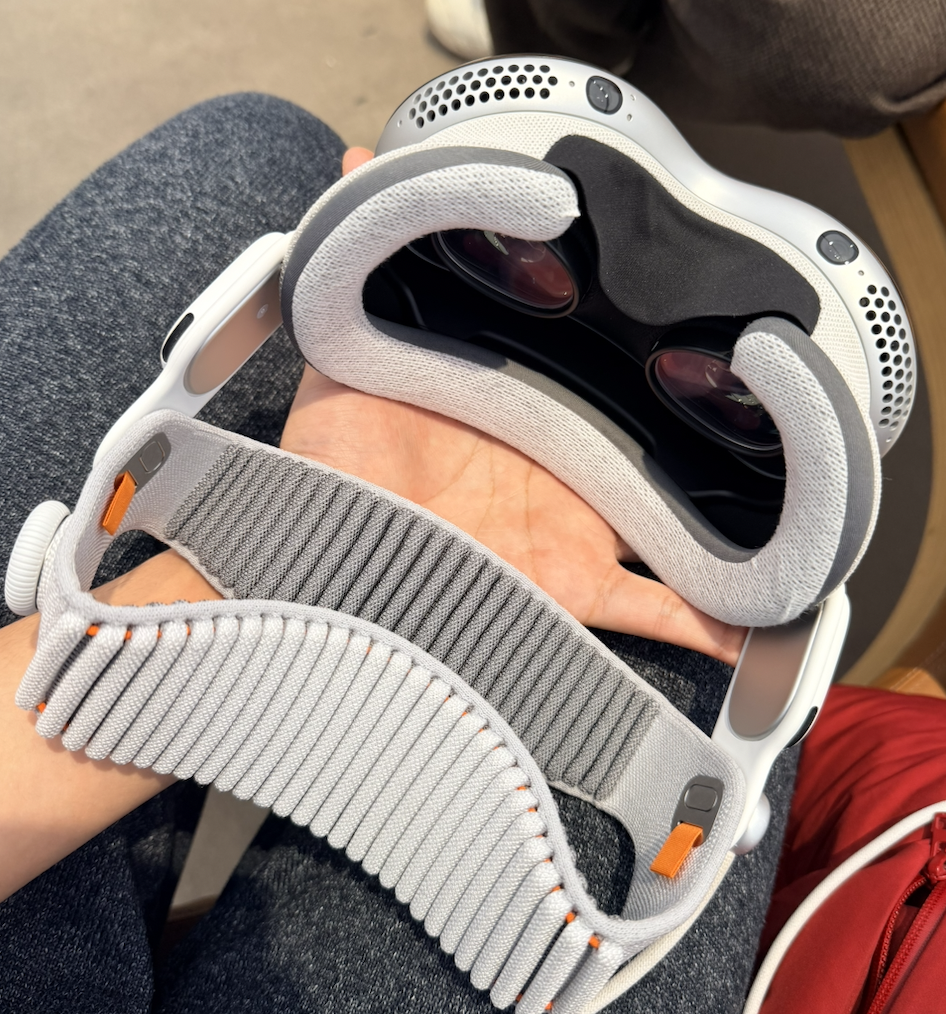
The Vision Pro still looks close to a standard VR headset, but the build quality and texture are vastly different. With the Apple staff’s permission, I took a few photos of the unit I tested today.
Wearability
During the approximately 30 minutes I wore the Vision Pro, its physical presence on my head was quite obvious. However, contrary to many reviews, I didn’t feel it oppressively squeezing my face. The Vision Pro is still not a lightweight device—after all, official specs state it weighs 750–800 grams. The lack of facial pressure might be because the new headband helps distribute the weight more evenly across the entire head.
My demo unit suffered from severe light leakage. Specifically, the nose bridge area couldn’t sit flush, causing light to bleed in from below. No matter how much I adjusted the tightness of the headband or the position of the Vision Pro, it didn’t improve. The staff told me that retail units have more personalized customization options and are designed to prevent light leakage around the eyes during wear, so my experience today was not how it was intended to be. Take this point with a grain of salt.
The Vision Pro’s power cable would sometimes wrap around to the other side of my neck, which is actually quite bothersome. Once you put on the Vision Pro, moving your head becomes relatively more difficult than when not wearing it, and your field of view is somewhat obstructed (I will expand on this later). Such issues become even more apparent when you have to manage cables attached to your body. Therefore, when first putting it on, you need to ensure the cable is positioned in a way that won’t negatively impact your subsequent movements to avoid unnecessary hassle.
Visual Experience
I once owned a VR headset and used it extensively. Compared to that device, the Vision Pro is vastly clearer. Most of the time, the information you see is clean and sharp. However, contrary to the “crystal clear” look I had imagined, whenever you shift your gaze, the content displayed in front of you momentarily blurs. After verifying this repeatedly, I found it to be the norm. This actually caused so much interference that I felt noticeable discomfort and motion sickness. Additionally, under certain viewing angles, the screen exhibited an obvious green tint, requiring multiple manual adjustments to the headset’s position to fix.
By default, the Vision Pro maps what your eyes see onto its screens with relatively low latency. After putting it on, I stood up, took a few steps, and found I could move around normally. I could also see my own hands. However, you get the illusion that “your eyes have become wide-angle lenses,” and you’ll notice the proportions of real-world objects differ from what you see with the naked eye. Even in a well-lit Apple Store, noise and blurriness appeared in objects that were relatively far away. It’s fair to say that theoretically, you can still move around and do what you want while wearing the Vision Pro, but the experience is definitively degraded.
The staff guided me through the Photos app, Apple TV, and some spatial photos and videos within a standalone app. Four specific experiences are worth mentioning. The first was a video of children singing “Happy Birthday” and blowing out candles right in front of me. The second was a dinosaur experience created by Apple in a standalone app. The third was a compilation-style video on Apple TV that transported you to a live concert. The last was a movie clip of Super Mario on Apple TV.
The first video truly felt like those children were right in front of you. Paired with the device’s high-quality speakers, it felt incredibly lifelike. However, when you turn your head, the video locks to the center of your field of view (imagine a crosshair in an FPS game) and moves with your gaze, rather than staying locked in physical space like a static window. It felt like watching a stage play without being able to leave your current seat.
The second, the dinosaur app, was also a very bizarre experience. If you extend your index finger, a butterfly lands on it. While you can still clearly see that its limbs look somewhat “suspended” in the air, the distance is close enough, and it moves with your hand. The dinosaurs emerged from a screen, featuring realistic and highly three-dimensional modeling. You can feel them right in front of you. However, when a real person gets too close to you, the Vision Pro appropriately adjusts the virtual content, making it more transparent. In this experience, when you turn your head, the content does not follow your gaze but remains anchored in physical space.
The third and fourth pieces of content were both fixed-frame videos. The difference is that the third video presented a 180-degree stereoscopic view in front of you, while the fourth projected a window into the distance and then “turned off the lights,” placing you in a theater-like environment. Honestly, neither left much of an impression on me. In the third video, many areas I looked at were blurry. Imagine the feeling of watching a 1080p or even 720p video on a massive 3D IMAX screen—that was exactly how I felt. The fourth was just a standard movie clip; frankly, I’d still prefer holding a screen in my hand to watch it.
Finally, the staff demonstrated a non-video scenario: rotating the Digital Crown to blend a virtual environment into my reality. I tried a few different ones—a forest with a lake, the moon, and Jupiter. How should I put this… they can indeed instantly overlay your field of view with new scenery outside the real world. But because these landscapes are entirely static, rather than feeling physically immersed, it felt more like mere visual immersion. At best, it acts as a 360-degree wallpaper.
In summary, the Vision Pro did provide a sense of immersion in specific scenarios, but to me, it felt more like a novelty than something truly mind-blowing. The 3D spatial videos did achieve an immersive presentation, but I didn’t feel like I was transported to another world while watching them. The motion blur when moving my head, the light bleed under my nose, and the undeniable physical presence of the headset pressing against my face mean I wouldn’t consider wearing the Vision Pro when deciding to watch a video.
System OS
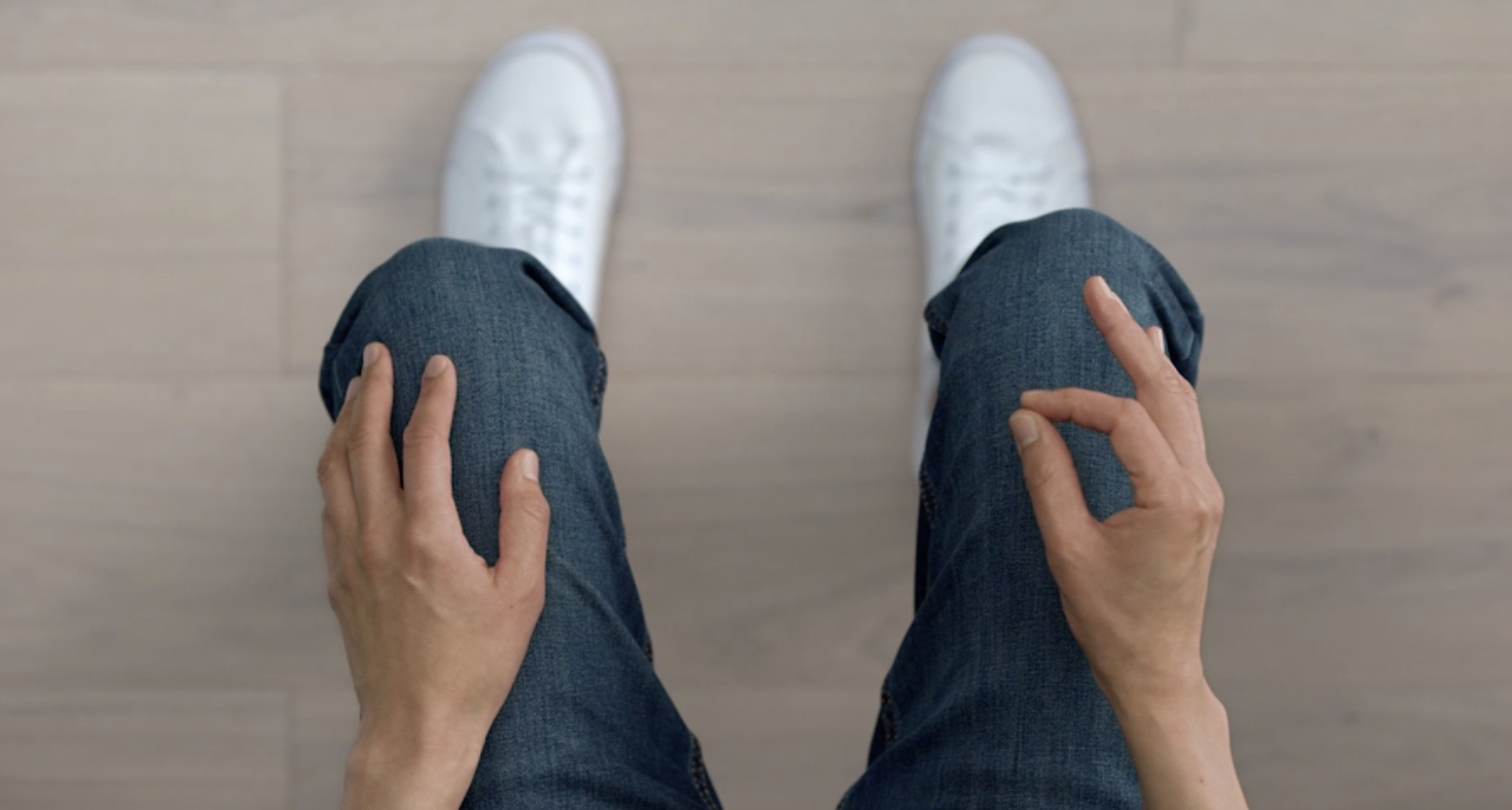
Before starting, the staff had me scan my face using an iPhone’s front-facing camera, similar to setting up Face ID. The process was very fast. Once I put the Vision Pro on, I had to hold my hands open for it to scan them. After that, I had to stare at six small dots that appeared and pinch my right index finger and thumb together, repeating this for three rounds until the system calibrated. I found an image of this core gesture on Apple’s official website for reference here.
Upon entering visionOS, I had to press the physical “Digital Crown” button on the top right of the device to open the app launcher. Every app window you open automatically spawns wherever your eyes are looking. To move them, you need to look at the small horizontal bar at the bottom of the window, pinch with two fingers, hold, and drag the window anywhere in space. Apple has a promotional image showing this below; the actual look and feel are quite similar.
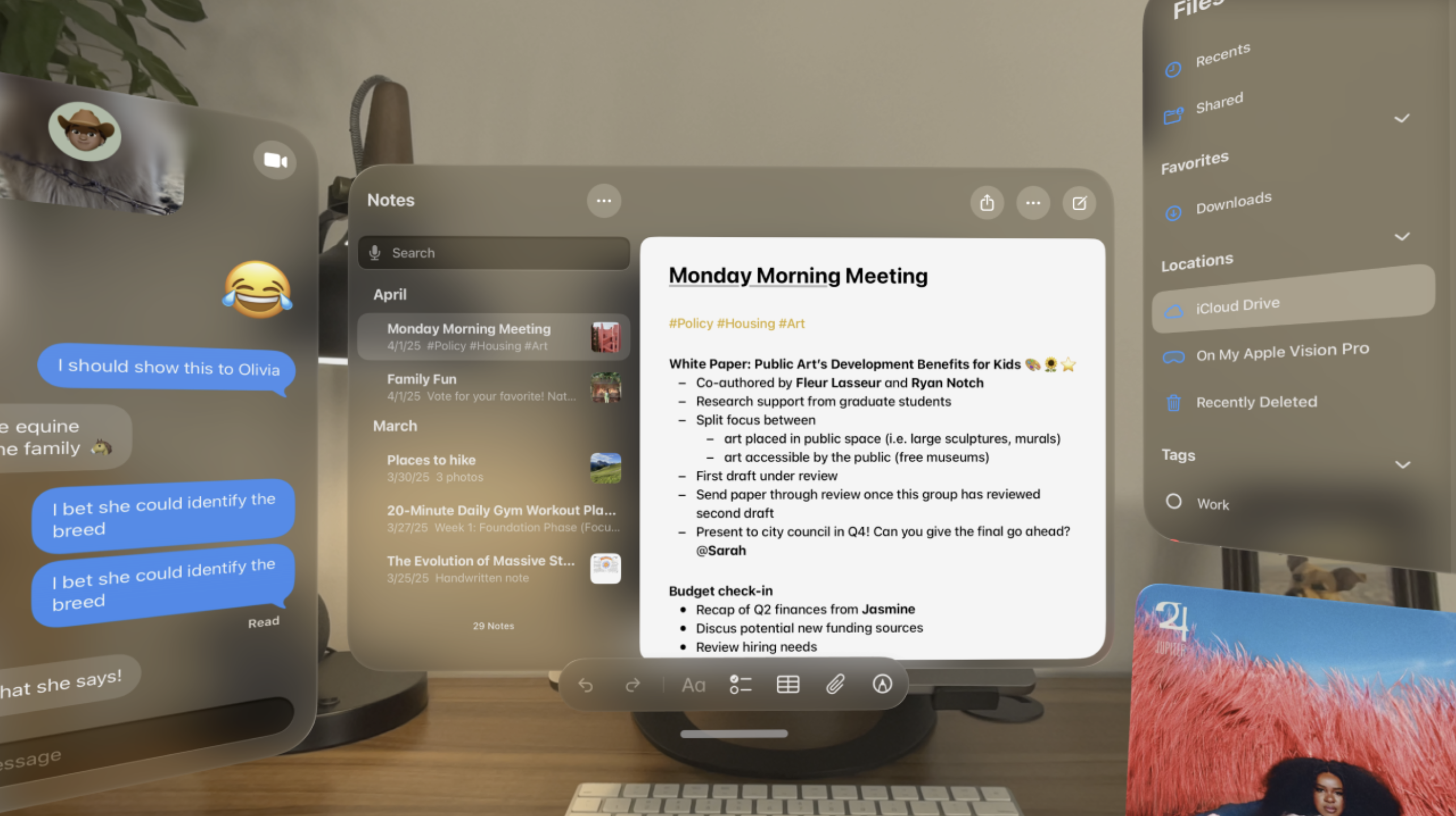
Generally speaking, every app window feels like a floating screen with no physical collision volume. They can be freely resized, placed anywhere in the room, and pushed further away or pulled closer using gestures.
To close a window, you must look at the small horizontal bar at the bottom, wait for an “x” to appear on the side, stare at the “x”, and pinch with two fingers. This seems completely bizarre to me. You could easily have just used the traditional three buttons in the top left or right corner of the window. I have no idea what Apple was thinking by doing it this way.
During the demo, I asked the staff if there was a task view similar to the iPhone or iPad—a gesture or action that brings all active windows into view so you can close them freely. He told me that this feature does not currently exist. Because window placement is mapped to real physical space and manually positioned by you, you literally have to visually search around the room to find them and close them manually. I don’t know if the windows I opened could be closed via his iPad’s touchscreen, but he was certainly able to summon new windows for me through his controls.
To bring up the Control Center, you have to bring your right hand’s fingers together and flip your hand over, stare at the new options that appear, and then pinch. I also explored the visionOS settings. One thing that shocked me was that the brightness of the device cannot be manually adjusted; I found no option for it. The staff confirmed this. Additionally, when you are AirPlaying/mirroring the Vision Pro’s screen, you cannot simultaneously screen record. While the Control Center gesture isn’t overly difficult, it is by no means quick or simple. Compared to the single tap or swipe required on a phone or Mac, this combination of actions feels incredibly clunky.
Because I couldn’t test it with a physical keyboard or other Apple devices, I could only try typing on the virtual keyboard. The experience was abysmal. It feels exactly like using a controller to type on a gaming console’s UI. You have to complete three steps to input a single character: stare at the key on the virtual keyboard, wait for it to highlight, and then maintain your gaze while pinching your fingers to confirm. Having tried both this method and physically poking the virtual keys with my index finger, my conclusion is that the virtual keyboard is strictly for emergencies. Trying to type or write anything efficiently this way is impossibly slow—even worse than using a console controller.
Of course, since the demo unit wasn’t linked to my personal devices, this was just a test, and I didn’t actually type out any full documents. However, the weight of the Vision Pro is impossible to ignore when your head is angled downward to type.
Finally, I browsed the visionOS App Store. Compared to other Apple platforms, the number of apps available is pitifully small. Scanning through, the only one I recognized was Microsoft Office; the rest were completely unfamiliar. The staff informed me that the App Store on the demo unit is identical to what I’d see on a retail unit. This confirmed to me that the visionOS ecosystem is currently suffering from a severe lack of developers. Compared to all the other major and minor hardware issues, this is what I believe is the most critical flaw facing the Vision Pro today: there are no apps.
Conclusion
The entire experience aligns with what I stated at the beginning. The Vision Pro simply did not meet my prior expectations. Even if the Vision Pro cost the same as a smartphone, in its current state, I still couldn’t convince myself to buy it for any reason. Moreover, its actual price—factor in the custom lenses—exceeds 30,000 RMB. To me, that amount of money represents far more meaningful things.
When evaluating the hardware, I think Apple’s most pressing issue is the “Mixed” part of “Mixed Reality.” Even as the Vision Pro tries its hardest, using cutting-edge tech, to seamlessly blend the virtual and real worlds, the actual experience falls far short of the quality required to convince me to wear it for long periods. The core issues are, unsurprisingly, weight and visual fidelity. If there is noticeable visual degradation and distortion in a brightly lit Apple Store, those issues will only worsen in darker environments. When I took the Vision Pro off, I genuinely felt a wave of relief—my vision was bright and sharp again, and my head could move freely. This alone proves that its wearing experience is far from comfortable. Only by fixing these fundamentals can the Vision Pro guarantee that users will actually want to continue using it.
On the software side, while many of visionOS’s interaction mechanics are novel and stable, they are not “easy to use,” and some are even counter-intuitive. I cannot convince myself to put down my phone and use this headset to do things my phone can already do. The ecosystem desperately needs developers to build and adapt new apps. Putting aside the potential of Mac Virtual Display, I really can’t think of any reason for this standalone device to exist, other than the few audio-visual entertainment scenarios Apple showed me at the start. And who is going to spend over 30,000 RMB just for those scenarios?
What is the future of spatial computing? Assuming all the above issues can be resolved, what will these devices look like in the future? While I can’t provide a grounded technical blueprint, I can offer some hypotheses from a consumer’s perspective.
In my view, my everyday glasses are the form factor that Vision Pro’s visual delivery needs to reach. If future display technology allows colors to render on transparent glass—if my glasses could transmit natural real-world light to my eyes while simultaneously displaying colorful, interactive virtual windows—it would solve the Vision Pro’s core problems at the lowest technical level. Meanwhile, I’ve always advocated that if a distributed hardware design offers a better experience, there is no need to rigidly pursue an “all-in-one” philosophy. The glasses would act purely as the visual output device. Input could be handled by a ring or gloves for gesture sensing. A cross-body strap could house the necessary cameras for optical tracking. Finally, the computing unit could be offloaded to a smartphone-like puck. Separating the system into input, processing, and output modules would fundamentally eliminate the excess weight on the head and the unavoidable invasiveness of the Vision Pro’s current design. Modularity would also make repairs easier and troubleshooting simpler. The downside? Charging and putting it all on might be more cumbersome. The three modules could communicate using a proprietary low-latency protocol. Given their close physical proximity, data transmission latency could be minimized. Considering processing power and signal interference, I pin my hopes on more efficient wireless transmission protocols and vastly more powerful mobile processors in the future. But since we are imagining the future, maybe wireless charging across the body will already be a reality?
Of course, a brain-computer interface (BCI) might be the most fundamental and ambitious solution. Bypassing external environments and communicating directly with the human brain’s information processing organs—reading the body’s input signals directly, processing them, and outputting them straight to the brain—might be the ultimate endgame. After all, there are no better close-range cameras in the world than our own “eyes.”
Returning from sci-fi daydreams to reality, what I advocate for is solving problems at their root. There is a massive technological chasm between “transmitting signals to screens via cameras,” “overlaying computed graphics onto natural optical light,” and “communicating directly with the brain in a closed input/output loop.” The current world can barely make the first approach usable in specific scenarios. But only by continuing to explore alternative paths—such as transparent emissive materials and highly efficient signal transmission—can we achieve root-level breakthroughs in spatial computing. If a Vision Pro can eventually be as light as my regular glasses, and free from the motion blur I experienced today because it no longer relies on optical camera passthrough, I think that is when I will finally have a reason to choose it.